Effective July 28, 2026
Text Alerts opt-in evidence
Public, read-only reviewer evidence of the AI RingGuard Settings > Text Alerts consent flow operated by BYD Ministry | Mountain Home Marketing Ministries & Computer Repair Services. This page does not collect consent.
This page does not collect consent
This page exists so carriers, reviewers, and customers can read the exact opt-in language used inside AI RingGuard. No form on this page submits an opt-in, and no message is ever sent because a person visited this page. Enrollment happens only inside the authenticated account.
How a real opt-in happens
- The business owner or authorized administrator signs in at airingguard.com.
- They open Settings > Text Alerts.
- They enter or confirm the destination mobile number that should receive alerts.
- They read the complete disclosure shown immediately beside an optional checkbox that is unchecked by default.
- They check the optional box.
- They click the Enable Text Alerts button.
- AI RingGuard immediately records consent and queues the recurring-program confirmation with frequency, possible carrier rates, HELP, and STOP instructions. Delivery is attempted through the approved provider route.
Accepting the AI RingGuard account or service terms never enables text alerts. A user may continue using AI RingGuard without SMS. If the destination is changed, saving the change turns alerts off for the prior number; enabling the new number requires a fresh opt-in. Until the change is saved, the previously saved destination remains active.
The confirmation reads: “AI RingGuard Text Alerts enabled. Message frequency varies. Message and data rates may apply. Reply HELP for help or STOP to opt out.”
Consent control shown in Settings
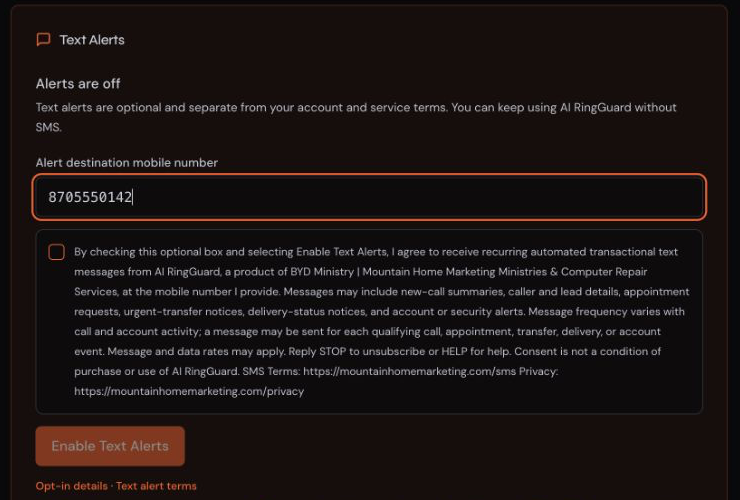
Text Alerts
Alert destination mobile number
(___) ___-____
[ ] By checking this optional box and selecting Enable Text Alerts, I agree to receive recurring automated transactional text messages from AI RingGuard, a product of BYD Ministry | Mountain Home Marketing Ministries & Computer Repair Services, at the mobile number I provide. Messages may include new-call summaries, caller and lead details, appointment requests, urgent-transfer notices, delivery-status notices, and account or security alerts. Message frequency varies with call and account activity; a message may be sent for each qualifying call, appointment, transfer, delivery, or account event. Message and data rates may apply. Reply STOP to unsubscribe or HELP for help. Consent is not a condition of purchase or use of AI RingGuard. SMS Terms: https://mountainhomemarketing.com/sms Privacy: https://mountainhomemarketing.com/privacy
Enable Text Alerts
The checkbox is unchecked by default and optional. The button stays disabled until the box is checked and a valid mobile number is present.
Consent records
When the owner clicks Enable Text Alerts, AI RingGuard records the exact recipient number in E.164 format, the authenticated user and account, the timestamp, the consent-text version, the source of the consent (authenticated Settings), and the current opt-out state. Records are retained for the life of the account and after opt-out as proof of consent history. Replying STOP records an opt-out and stops further messages.
Program policies
- SMS Terms: https://mountainhomemarketing.com/sms
- Privacy: https://mountainhomemarketing.com/privacy
- Terms: https://mountainhomemarketing.com/terms
- AI RingGuard program page: https://airingguard.com/sms